1
Demo ID
Enter this only when using a demo license. Leave it blank for real accounts.
Gold Parameter Guide
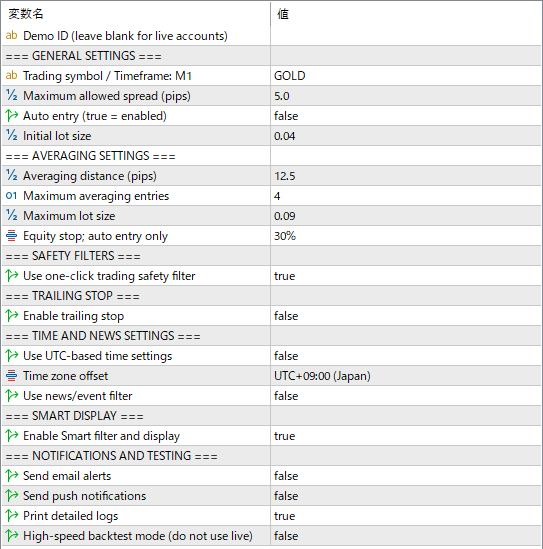
The Gold version is a discretionary support tool, not a fully hands-off robot. This page focuses on the visible settings that real users should understand, especially the ones directly connected to risk.
 1
2
3
4
5
6
7
8
9
10
11
12
13
14
15
16
17
1
2
3
4
5
6
7
8
9
10
11
12
13
14
15
16
17
Enter this only when using a demo license. Leave it blank for real accounts.
Designed for Gold (XAUUSD) on an M1 chart. If the timeframe is different, the EA will show a warning.
Blocks new entries when the spread is too wide. Important for Gold, as spreads can spike sharply around news events.
When true, the EA enters automatically. When false, it runs in discretionary support mode — the trader makes entry decisions based on the screen display.
※ Default is false. Automatic entries will NOT be made. Please be aware of this.
The first order size. Gold carries high risk, so start with a small lot in live trading.
The price distance before the next averaging entry can be added. A smaller value adds positions faster.
This value is automatically adjusted by various filters. You generally do not need to change it.
The maximum number of averaging positions. This has a major impact on risk during strong Gold trends.
Caps the largest lot size the EA can use. Prevents exposure from growing beyond the intended range.
Closes all positions when equity reaches the selected percentage of balance. Only active when auto entry is enabled.
Gold-only protection that checks the one-click trading panel state before operation.
※ This is an entry protection feature. Do not enter a trade when the one-click trading panel is not visible.
Protects profit by trailing the close line after price moves favorably.
⚠ Important: Time Zone Setting
This EA was backtested and designed using Japan Standard Time (JST / UTC+9).
Living in Japan: Leave as false (default). No changes needed.
Living outside Japan: Set to true and set Time zone offset to your local timezone.
Default is UTC+9 (Japan time). No change needed for Japan residents. Only change this if you set UTC-based to true and live outside Japan.
Controls entries around important events. Intended for use when auto entry is enabled.
Enables the Smart Monitor display and filter on the chart. Normally leave this set to true.
Email and push notification settings. These work when an email address or MetaQuotes ID is configured in MT5.
For Strategy Tester only. Never use this in real trading.