How much capital should I use?
The public two-year backtests started from 1,000 USD. The figures below are reference levels calculated from historical maximum equity drawdown under the tested margin environment. They are not minimum guarantees and are not a recommendation to use overseas FX brokers.
Historical max equity DD: about 421 USD.
Historical max equity DD: about 342 USD.
Historical max equity DD: about 587 USD.
The tested lot sizes were EURUSD 0.08, GBPUSD 0.06, and USDJPY 0.05. If you reduce the lot size, the required capital reference can also be lower under similar conditions. However, risk does not become safe by simple proportion alone because spread expansion, fast markets, and stacked averaging entries can change the required margin and floating loss.
These are not minimum guarantees. Required capital varies depending on leverage, spread, execution conditions, and sudden market moves.
Can I use the same capital with Japan's 25x leverage?
No. The capital guide above is only a reference based on the tested high-leverage margin environment. It does not recommend overseas FX brokers or any specific broker type. With Japan's 25x leverage, the required margin is much larger, so you need significantly more capital.
Do you recommend overseas FX brokers?
No. The broker and leverage conditions shown on this page are reference conditions used for backtesting and explanation only. TC-Angel does not recommend violating Japanese Financial Services Agency rules, local regulations, or the laws of any country or region.
Can I lose money?
Yes. No EA can guarantee profit. TC-Angel can reduce and control some risks, but losses can still occur due to market movement, spread, slippage, broker conditions, or unexpected events.
In live trading, start with spare capital you can afford to risk, and decide in advance how much loss you are willing to accept.
Why is the backtest extremely slow?
For Strategy Tester only, set Backtest High Speed Mode (Do not use in real trading session) to true. Do not enable it on a real trading account.
For more reliable backtesting, use trusted historical data. Results can vary depending on the data source, spread, execution assumptions, timezone, and test period, so your results may not match the published reference tests exactly.
Do I need FX knowledge?
You do not need advanced FX knowledge to install and operate TC-Angel, but basic knowledge is strongly recommended. Please understand lot size, leverage, margin, spread, drawdown, and the risk of automated trading before using a real account.
What is Smart Monitor?
Smart Monitor is TC-Angel's pre-entry condition check system. It checks Buy Risk, Sell Risk, entry conditions, averaging limits, position state, and trading time before allowing operation.
Is Smart Monitor an AI that constantly monitors the market?
No. Smart Monitor is only a rule-based confirmation layer used before entries and key actions. It does not continuously monitor the market as an AI.
Can TC-Angel stay idle even after I attach it to a chart?
Yes. TC-Angel is designed not to force trades when conditions are not suitable. It may stay idle because of spread, trading time, event/news filters, margin, symbol, timeframe, license status, or account settings. Please check the Experts log and the input settings first.
Do I need a VPS?
A VPS is recommended if you want stable 24-hour operation. TC-Angel can run on a home PC, but it will stop if the PC is shut down, goes to sleep, loses internet connection, or MetaTrader 5 is closed. For real-account operation, prepare an environment where MT5 can stay online.
As an overseas VPS reference, you can check Hyonix. Plans start from around $12.00/month. We recommend a Windows Server plan with at least 4 GB RAM. This is an affiliate link. Please choose a VPS after checking pricing, server location, latency, and support conditions yourself.
Can I use TC-Angel with a Japanese domestic FX account?
It may be technically possible, but Japan's 25x leverage requires much larger margin. The capital guide on this site is based on tested reference conditions and does not recommend using the same capital level with 25x leverage. Always check your broker's rules and margin requirements.
What should I do if license authentication fails?
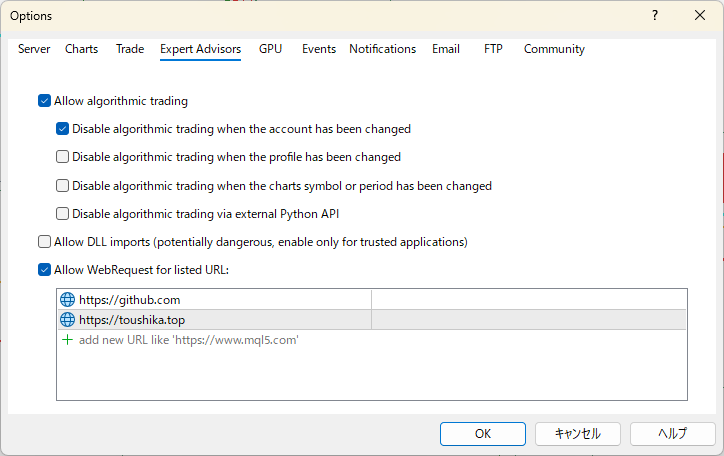
Please check the MT5 WebRequest allowed URL, account number, Demo ID, internet connection, EA inputs, and license expiry. Add https://github.com and https://toushika.top to the WebRequest allowed URL list. If it still does not work, contact support@toushika.top with your account number or Demo ID, product name, and the error message shown.
What kind of operation style do you recommend?
We recommend starting with a small lot size and sufficient spare capital, then confirming the behavior on a demo account before moving to a real account. Before live trading, decide in advance when to withdraw part of the profit and how much loss you are willing to tolerate. Rather than compounding aggressively without a plan, it is safer to separate and manage profits regularly.
This EA uses an averaging / martingale approach. If profits accumulate in the account, a sudden market move can wipe them out quickly. We recommend moving profits to a separate account as often as possible — ideally every day. Making withdrawals a daily habit helps protect your capital in the long run.
Which pairs are available first?
EURUSD, GBPUSD, and USDJPY are prepared first. The published backtests used EURUSD 0.08 lot, GBPUSD 0.06 lot, and USDJPY 0.05 lot.
Can I run multiple currency pairs at the same time?
You can attach multiple EAs to a single account and run them together. However, because this EA uses an averaging / martingale approach, holding positions on multiple pairs simultaneously greatly increases the risk of a total loss. For this reason, the EA is designed to not open new entries on other pairs while a position is already held on any pair. If you want to hold positions on multiple pairs at the same time, you will need to use a separate account for each currency pair. Please keep this in mind when running multiple EAs on the same account.
How can I get support?
If you experience any issues, please contact support@toushika.top with the following information. Having these details ready helps identify the cause quickly.
A full-screen capture at the time the issue occurred. Please make sure the EA panel and price action are visible.
The contents of the "Experts" tab at the bottom of MT5. Please copy the log text around the time of the issue, or send a screenshot.
The contents of the "Journal" tab at the bottom of MT5. Sending this together with the Expert log helps us understand the situation faster.
Tip: Enable Print detailed logs before reproducing the issue to capture more information in the Expert log.