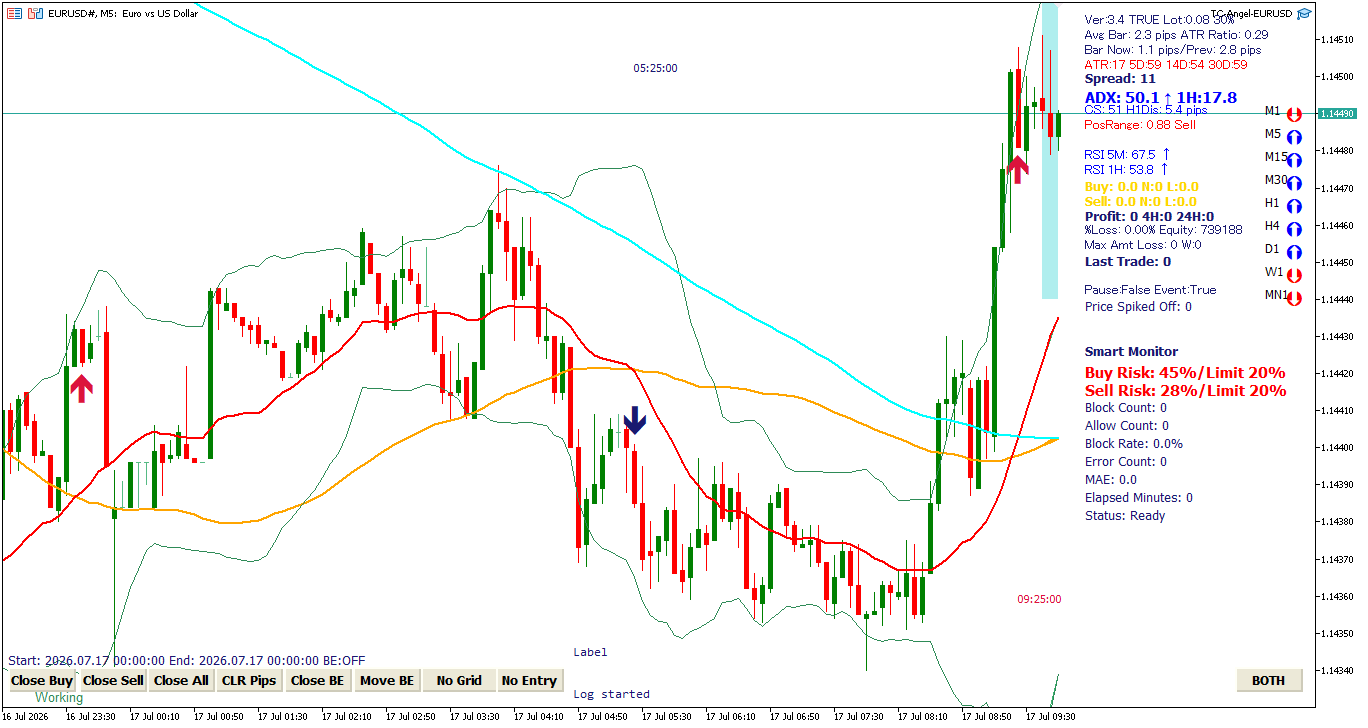
TC-Angel FX Edition allows you to check trading status, market momentum, AI filter decisions, and manual intervention buttons on the chart for EURUSD, GBPUSD, and USDJPY.
Please note: The values and arrows displayed on the screen are auxiliary information to help you grasp the market situation and do not guarantee future profits or price fluctuations.
Lines and Arrows on the Chart
The chart displays moving averages, bands to check volatility, and arrows indicating the positions where buy or sell conditions were detected. An arrow alone does not guarantee that a trade will be executed; entry occurs only when multiple conditions such as spread, time, news, and Smart Monitor are satisfied.
Basic Information (Top Right)
Ver / TRUE・FALSE / Lot / % indicate the EA version, auto-entry status, initial lot size, and margin protection threshold.
TRUE represents active auto-entry, and FALSE represents paused status.
Avg Bar is the average range of recent candles, and Bar Now / Prev is the range of the current and previous candles. ATR / ATR Ratio serves as a reference for daily volatility, and a HIGH indicator shows that volatility is higher than usual.
Spread is the current spread. If it exceeds your maximum allowed spread setting, the EA will bypass new or additional entries.
ADX, RSI, CS, and PosRange
ADX shows trend strength, while RSI 5M / RSI 1H checks overbought/oversold levels on the short-term and higher timeframes. OVER LIMIT shows that the values have exceeded the EA's threshold.
CS represents Currency Strength, and H1Dis is the distance between the current price and the 1-hour EMA20. Situations where currency strength is heavily skewed or the price is far from the higher timeframe moving average are generally unfavorable for counter-trend entries and are used in filter logic.
PosRange represents the position of the current price within the range of the last 50 candles. A value closer to 0 indicates the bottom of the range, and closer to 1 indicates the top.
Open Position Information
Buy / Sell displays the profit/loss in pips, the number of open positions (N), and the total lot size (L) for buy and sell directions. Profit is the current floating profit/loss, 4H / 24H is the closed profit/loss within those periods, and Max Amt Loss is the maximum floating drawdown recorded during the current cycle.
Pause / Event shows the pause status and the news filter state. If Pause: True and Event: True, it indicates that trading is temporarily suspended due to news filter settings.
Understanding Smart Monitor (AI Entry Filter)
Smart Monitor uses an AI model to evaluate whether the initial entry should be bypassed in the current situation. It does not predict profits; rather, it is designed to avoid high-risk initial entries and subsequent deep averaging cycles.
Buy Risk / Sell Risk are the risk scores calculated by the AI for buy and sell directions. In the normal mode of the FX edition, lower values indicate lower risk. If a score exceeds the set Limit, the initial entry in that direction is blocked. For example, if Buy Risk: 45% and Limit: 20%, the buy direction is blocked.
The AI evaluates factors such as price change, range, ATR, distance and slope of moving averages, time-frame alignment, higher-timeframe trend, currency strength, and signs of rapid market shifts.
Block Count is the number of blocks today, Allow Count is the number of passes, and Block Rate is the ratio of blocks to total events. These reset daily. Error Count is the number of AI prediction errors. If this number increases, pause the EA and inspect the expert logs or model configuration.
MAE is the estimated maximum adverse excursion from the initial entry, Elapsed Minutes is the holding time, and Status: Ready indicates that the model is active. BLOCK or ALLOW will show the most recent AI decision.
Control Buttons (Bottom)
- Close Buy: Instantly closes all buy positions for this currency pair.
- Close Sell: Instantly closes all sell positions.
- Close All: Closes all buy and sell positions.
- CLR Pips: Resets the pips display on the chart.
- Close BE: Toggles the close-at-breakeven mode.
- Move BE: Moves the stop loss to the breakeven level.
- No Grid: Temporarily suspends grid/averaging entries.
- No Entry: Temporarily suspends new initial entries.
- BOTH: Cycles the entry direction: BOTH → BUY ONLY → SELL ONLY.
Close Buy, Close Sell, and Close All trigger immediate execution. Always double-check your open positions, lots, and floating profit/loss before clicking.