The TC-Angel GOLD edition is designed to support discretionary trading on Gold. Before using the one-click panel, it is crucial to analyze the market environment, news, and Smart Monitor, and trade only when conditions align.
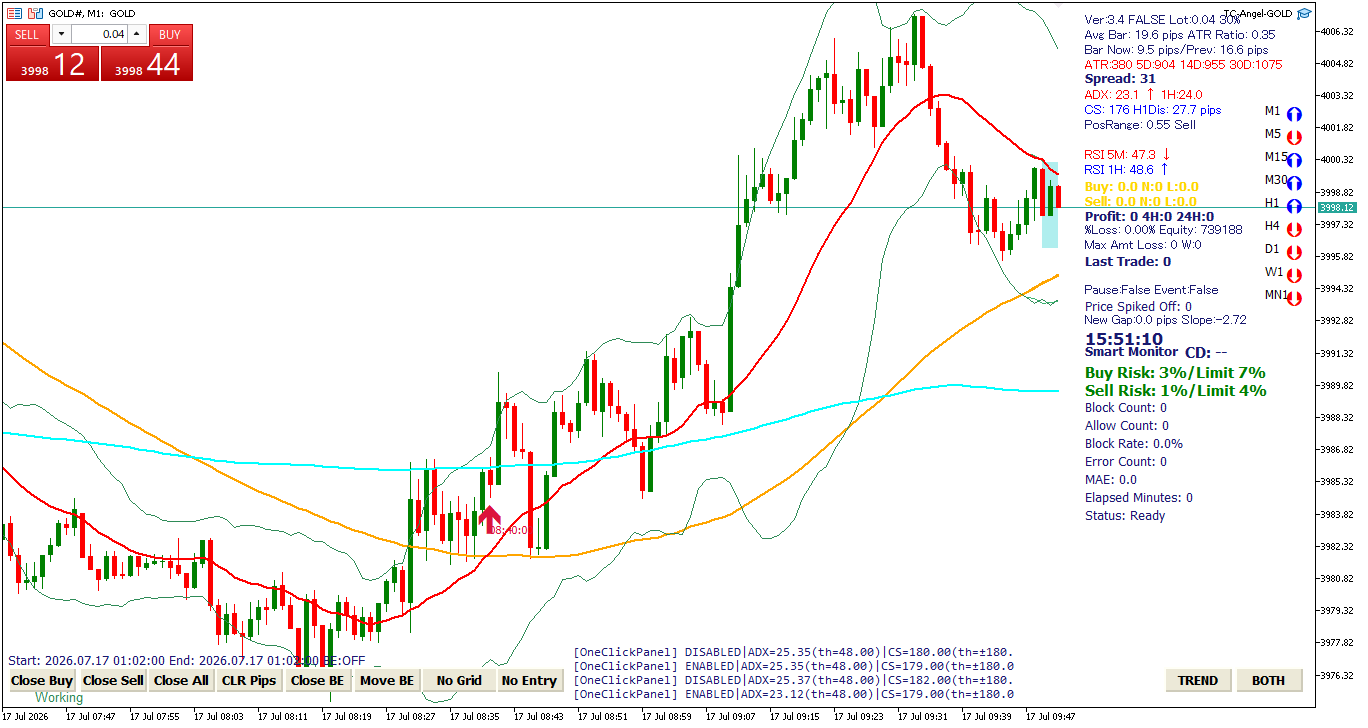
Please note: This article explains operation and risk management concepts. It does not guarantee profits. Gold moves rapidly; always start testing with small lot sizes.
GOLD Pre-Entry Verification Steps
1. Check the Time Window on the GOLD Dashboard
Before opening a trade, verify the GOLD Dashboard. This helps you identify whether the current time window is statistically favorable or requires caution.
Please note: The GOLD Dashboard may occasionally be offline. If it is unavailable, check the Avg Bar, ADX, CS, and Smart Monitor on the chart, and avoid entry unless all conditions are met.
Also, check the Avg Bar (Average Bar Range) on the screen. If the average range exceeds 30 pips, the market is moving faster than usual. Wait for the market volatility to subside.
2. Avoid Trading During Active Time Filters
TC-Angel GOLD edition includes preset trading suspension windows. Since the EA suspends execution during these times, do not perform discretionary manual trades using the one-click panel during these hours.
The suspension windows are based on local PC time (typically Japan Time) and are currently set to: 01:00–09:00, 09:00–12:00, 14:30–15:00, 15:30–16:30 (16:30–17:30 in winter), and 21:00–23:00. Note that another filter overlaps during 21:00–22:00 (22:00–23:00 in winter).
3. Do Not Place Immediate Orders Upon Alerts
The "Attention! Gold Entry Now" alert is a signal indicating an entry setup candidate, not a direct order instruction. When you hear the alert, check the following items in order before deciding to trade:
- Is the one-click trading panel displayed on the top left?
- Is the CS value within normal limits (i.e., not showing a red warning)?
- Is the ADX below 50 (to avoid strong trending phases)?
- Is the Smart Monitor showing a safe status (not a red warning)?
- Are you outside the 30-minute window before and after major economic news?
4. Verify the One-Click Trading Panel
The SELL/BUY panel at the top left is the control interface for manual orders. SELL opens a sell trade, BUY opens a buy trade, and the center value is the order lot size.
TC-Angel automatically hides the one-click trading panel during strong trends or extreme currency strength imbalances to prevent high-risk counter-trend entries. If the panel is hidden, prioritize safety and wait for the market to stabilize.
5. Check CS and ADX
CS indicates currency strength. As a rule of thumb, check that the CS value is around 180 or lower. If the value is high and displayed in red, a strong directional move is underway; avoid trading against it.
ADX indicates trend strength. When the ADX is near or above 50, a strong directional trend is likely active. Gold is prone to sudden extensions; avoid aggressive counter-trend entries or deep averaging under these conditions.
6. Check Smart Monitor
Smart Monitor shows whether the AI has detected unfavorable entry conditions. It evaluates price change, candle range, ATR, moving average distance/slope, higher-timeframe trend, currency strength, and signs of rapid market shifts.
Under the Risk / Limit display, a lower Risk score is better. If the Risk score exceeds the Limit and turns red, bypass entries in that direction. If your model version displays Success / Allow or QuickTP / Allow, a status of Allow or higher is required, with higher numbers indicating better setups.
Block Count, Allow Count, and Block Rate log the AI decisions for the day. If the Error Count increases, suspend trading and inspect the expert logs or model configuration.
7. Do Not Trade 30 Minutes Before and After News
Upcoming economic indicators and events are displayed on the screen. Make it a rule to avoid new entries 30 minutes before and after major news releases. Spreads widen, slippage occurs, and rapid moves can bypass standard analysis and AI filter logic during indicators.
8. Verify Trend Bars and the Chart
If the trend bars on the left are completely aligned in blue, green, or red, the market is heavily trending in one direction. Avoid trading against this momentum.
For intermediate and advanced traders, perform a final visual check on the chart itself. Check recent support/resistance levels, moving average directions, and candle momentum to make your final decision.
Crucial Warning: Golden Cross / Dead Cross Warnings
If you hear the announcement "Be careful Golden Cross / Dead Cross" after opening a trade, the market is warning of a potential large move against your position.
Specifically, if a cross occurs in the opposite direction of your open trades, or if the market moves strongly while you have only a few positions, consider closing the trades immediately. Instead of hoping for a reversal and adding more grid positions, prioritize cutting losses and waiting for the next setup.
Do not exit blindly; evaluate the cross alongside ADX, CS, Smart Monitor, and trend bars. However, when in doubt, reducing position size or exiting is the recommended risk management action.
For Advanced Users: Trend Mode (TREND)
TC-Angel GOLD edition is based on a grid-averaging framework, normally optimized for counter-trend or range setups. For advanced traders wishing to trade in the direction of strong trends, the TREND button at the bottom is provided.
In normal mode, if a strong trend is detected, the EA's grid-clearing logic adjusts execution to minimize drawdown. Activating TREND disables these trend-protection limits, allowing you to hold trend positions longer.
**How to Use:** Confirm a clear trend on higher timeframes, and activate TREND only when entering in the direction of that momentum (buying in uptrends, selling in downtrends).
Control Buttons After Entry
- Close Buy / Close Sell: Closes all buy or sell positions.
- Close All: Instantly closes all open GOLD positions.
- Close BE: Activates the close-at-breakeven logic.
- Move BE: Moves the stop loss to breakeven.
- No Grid: Suspends grid/averaging entries.
- No Entry: Suspends new initial entries.
- TREND: Toggles the GOLD-specific trend mode.
- BOTH: Cycles new entry direction: BOTH → BUY ONLY → SELL ONLY.
Close All executes instantly. Always verify your total positions, lot sizes, and floating balance before clicking.
Summary
In GOLD discretionary trading, never enter trades solely because an alert sounds. Run through the checklist: Dashboard, Avg Bar, One-Click Panel, CS, ADX, Smart Monitor, news events, trend bars, and the chart. If conditions do not align, wait. If a Golden Cross / Dead Cross warning sounds, prioritize capital protection above all.