Read the market atmosphere
Check trend strength and CS imbalance before deciding whether to trade, pause, or wait.
Discretionary Support Tool for XAUUSD
This Gold version is not a fully hands-off automated system. It is a discretionary support tool for traders who understand the beauty, violence, explosive potential, and serious danger of averaging / martingale trading on Gold.
Backtest Results
Historical references only. Future profit is not guaranteed.
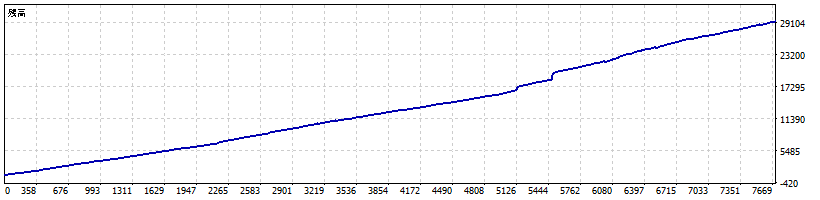
Two-year balance curve. The profit curve is strong, but floating-loss control is the key risk. The stronger the light, the deeper the shadow can become.
| Metric | Result |
|---|---|
| Period | 2024.05.31 - 2026.05.31 |
| Tested lot | 0.04 |
| Initial deposit | 1,000 USD |
| Net profit | 28,392.98 USD |
| Profit factor | 3.30 |
| Win rate | 74.81% |
| Trades | 7,689 |
| Max balance DD | 238.99 (4.53%) |
| Max equity DD | 965.16 (5.46%) |
| Expected payoff | 3.69 |
Gold Dashboard
Check trend strength and CS imbalance before deciding whether to trade, pause, or wait.
Risk expands as positions deepen. Heatmaps help visualize dangerous patterns and time windows.
Built from loss-pattern analysis, reach rates, recovery time, and historical Gold behavior.
Manual Trading
By default, Auto entry (true = enabled) is set to false. When false, no automatic entries are made. You decide when to enter based on your own judgment.
Before every trade, open the Gold Dashboard and check the current status.
If the dashboard shows "良い時間帯" (Good time window), it is statistically a tradeable time. The dashboard is displayed in Japanese — please use your browser's translation feature if needed.
When you hear the voice announcement "Attention! Gold entry Now", open your charting tool (e.g. TradingView) and visually confirm the chart looks good before proceeding.
If you hear this voice announcement after entering a trade, exercise extra caution. Price may move sharply.
Research
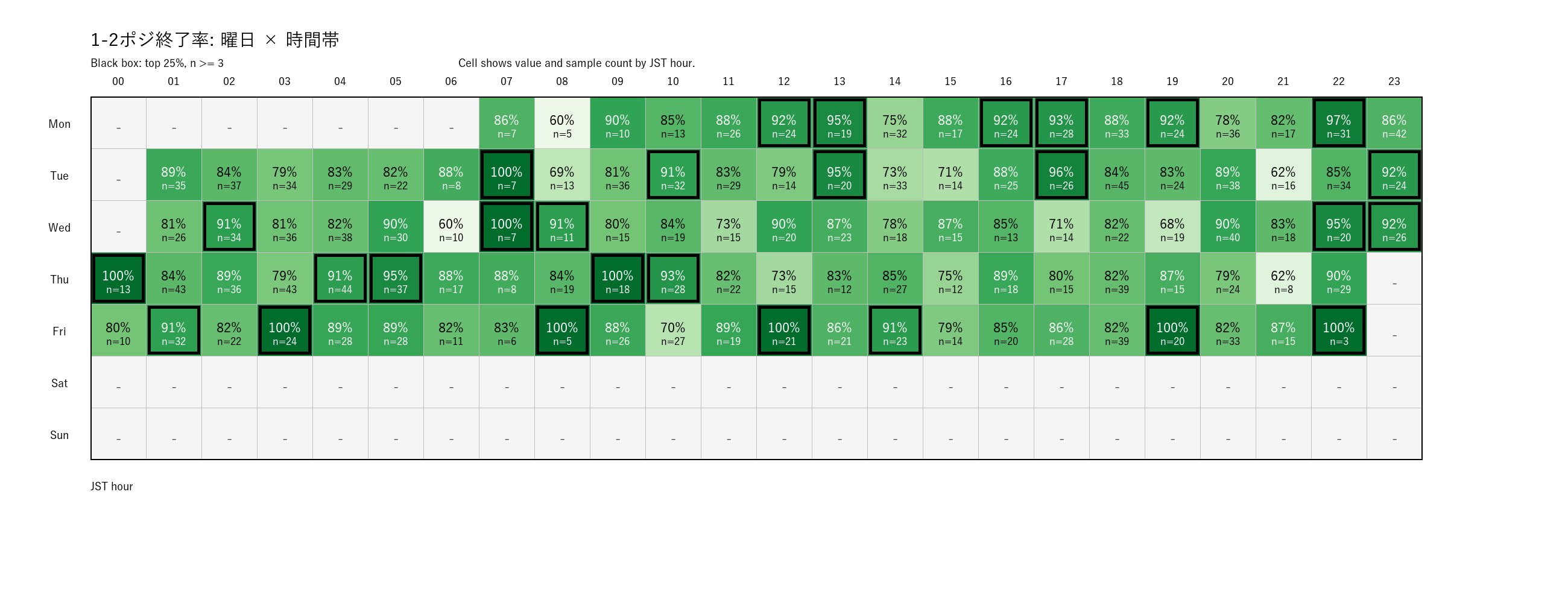
Analyzes patterns where positions can escape early.
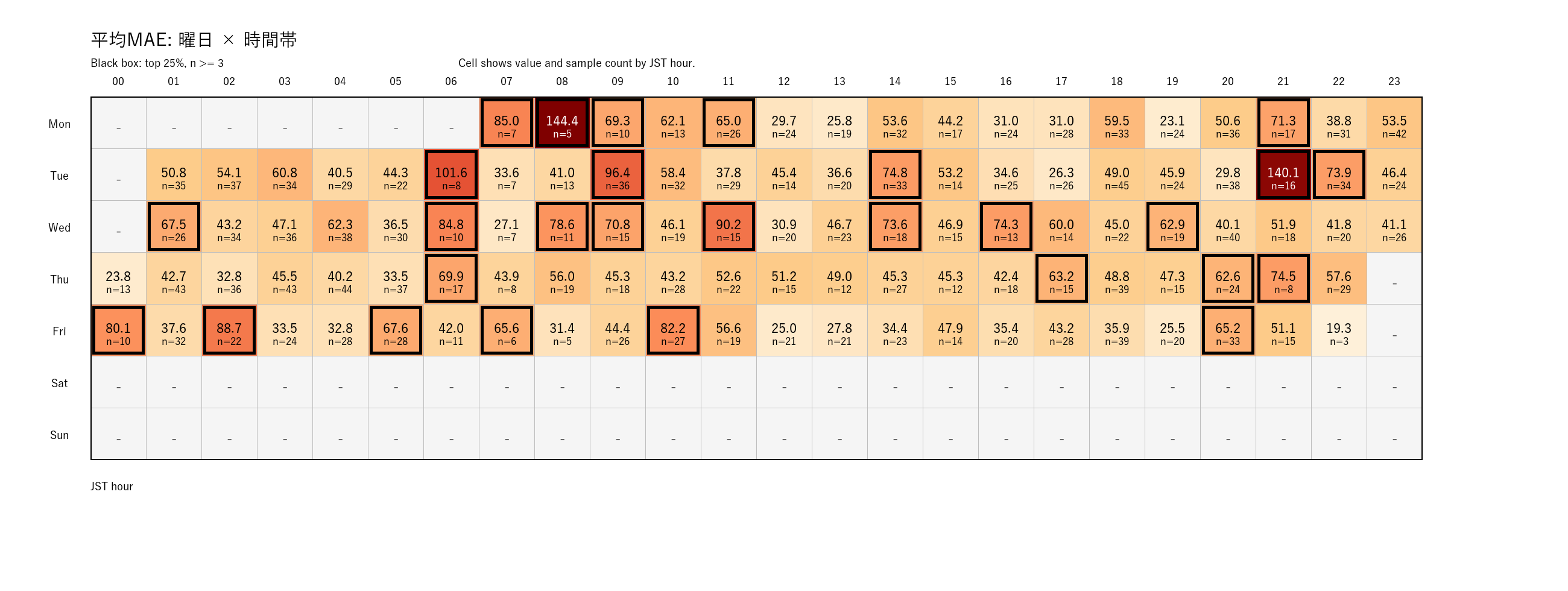
Visualizes risk tendencies such as average MAE before averaging gets too deep.
Risk First
A high win rate does not remove tail risk. One strong Gold trend can erase prior gains.
Do not start with aggressive lot sizes. This tool is not suitable if your account cannot tolerate floating loss.
This is best used with market awareness, dashboard checks, news awareness, and margin monitoring.
Download
The ZIP contains the EA file, README, and installation instructions.
Includes EA file, README, and installation instructions.
Start with a 14-day demo license, or get a real-account license.
Download the ZIP using the button above.
Place the EX5 file in MT5 under MQL5 > Experts.
Attach the EA to an XAUUSD M1 chart and enter your demo ID if using the demo license.
FAQ
For discretionary mode (Auto entry = false), 1,000 USD is a reasonable starting point. Gold moves aggressively, so start with spare capital and a small lot size to confirm the behavior before increasing exposure.
The Gold version is not recommended for beginners. It is better suited to intermediate and advanced users who understand averaging / martingale risk, floating loss, and when to stop. Please test it on demo for about two weeks first.
These results were tested using Japan-time-based conditions. Broker server time, historical data, spread, execution, and timezone settings can change the result.
Do not start aggressively on a real account. Confirm demo profitability, floating-loss behavior, and your own stop judgment first, then consider a very small lot size.
This EA uses an averaging / martingale approach. If profits accumulate in the account, a sudden market move can wipe them out quickly. We recommend moving profits to a separate account as often as possible — ideally every day. Leaving profits in the trading account increases your risk exposure over time. Making withdrawals a daily habit helps protect your capital in the long run.
Broker Account
Apply for License
Real account operation and dedicated license key issuance are managed via our support desk. Please apply using one of the options below.
*For demo licenses and FAQs, please use the links below.