1
Demo ID
Enter this only when using a demo license. Leave it blank for real accounts.
Parameter Guide
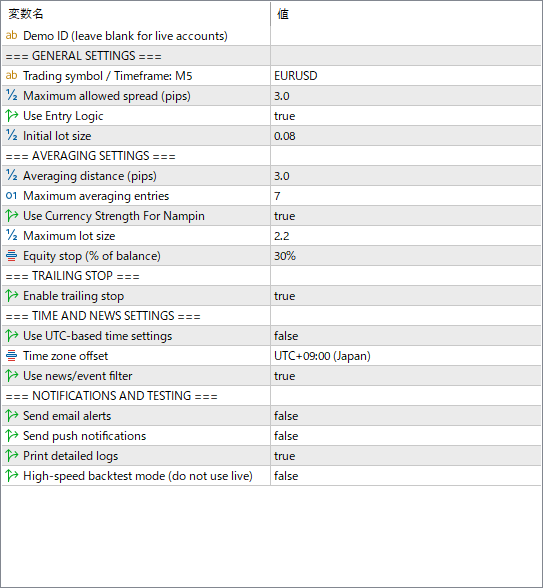
This guide is based on the current TC-Angel header files for EURUSD, GBPUSD, USDJPY, and Gold. It explains what each visible setting is for, without exposing internal strategy details.
 1
2
3
4
5
6
7
8
9
10
11
12
13
14
1
2
3
4
5
6
7
8
9
10
11
12
13
14
Enter this only when using a demo license. Leave it blank for real accounts.
The pair and timeframe prepared for this EA. FX versions are intended for M5.
Blocks new entries when the spread is too wide.
The first order size. This is one of the most important live-risk settings.
The price distance before the next averaging entry can be added.
The maximum number of additional averaging positions.
Caps the largest lot size the EA can use.
Closes positions when equity reaches the selected percentage of balance.
Protects profit after price moves favorably.
Controls UTC mode, timezone, and the news/event filter.
⚠ Important: Time Zone Setting
This EA was backtested and designed using Japan Standard Time (JST / UTC+9). All trading hour restrictions are based on Japan time.
Living in Japan: Leave Use UTC-based time settings as false (default). No changes needed.
Living outside Japan: Set Use UTC-based time settings to true, then set Time zone offset to your local timezone (e.g. UTC-5 for US Eastern). This ensures the EA's time filters run on your local time.
Controls email alerts, push notifications, and detailed logs.
For Strategy Tester only. Do not enable it for real trading.
With true (the default), the EA starts trading automatically from the first position when its conditions are met. Change it to false only when you want to open the first position manually and let the EA manage the averaging and exit cycle.
Keep this set to true (the default). It blocks averaging entries when currency strength is too high, helping reduce the risk of progressing into a deep floating loss. Only advanced users who understand and have tested this behaviour should consider setting it to false.